


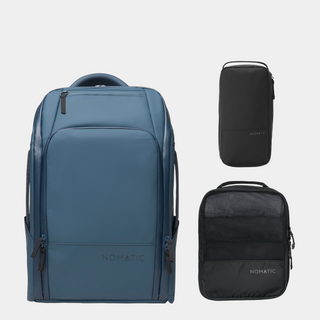







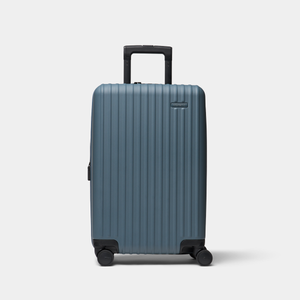

A laptop backpack that clears carry-on sizing in 2026 comes down to three numbers: linear dimensions, empty weight, and how the laptop compartment separates from everything else you're packing.
- Stay under 22x14x9 inches and 3 lbs empty to clear carry-on sizers and gate checks in 2026.
- A dedicated, padded laptop sleeve that opens flat at security beats a shared main compartment every time.
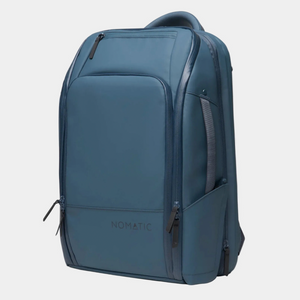
- The Nomatic Backpack and Navigator Backpack 15L both fit airline personal-item and carry-on rules without a scale fight.
- Skip bags with a single top-loading main pocket for laptop access — TSA wants it out fast, without unpacking clothes.
- Weight capacity matters more than volume once you're carrying a laptop, charger brick, and a change of clothes.
Why this matters
Airlines don't measure your backpack until you're at the gate, and by then a rejected bag means a checked-bag fee or a scramble to repack in the jet bridge. Most major US carriers cap carry-on personal items and bags around 22 x 14 x 9 inches, and gate agents have started enforcing sizers more aggressively through 2026 as overhead bin space gets tighter.
A laptop backpack has to do two jobs at once: pass that sizing check and protect a $1,000-plus device through TSA bins, jet bridge tosses, and rental car trunks. Get the compartment design wrong and you're either digging through socks to find your MacBook at security or watching the corner of your laptop take a hit against a hard case. This guide walks through how to choose a laptop backpack for carry-on flights step by step, not just a list of features to skim.
What you'll need
- A tape measure or the sizer template at your departure airline's website
- Your laptop's exact dimensions, including the charger brick if it lives in the same sleeve
- A kitchen scale, if you're deciding between two backpacks and weight matters to you
- A rough packing list for the trip (how many days, do you need a change of clothes on board)
- The Nomatic Backpack or a similarly organized daily-carry bag to use as a reference point while you shop
The steps
1. Measure against your actual airline's carry-on limits, not a generic number
Carry-on rules vary by carrier, and "22x14x9" isn't universal. Domestic US carriers mostly cluster around that figure, but regional jets and international budget carriers often run smaller — some cap personal items at 18 x 14 x 8 inches in 2026.
Check the specific airline's page before you buy, not a blog's summary of it. A backpack that's technically a "carry-on" size can still get gate-checked on a smaller aircraft. Common mistake: measuring the bag flat instead of fully packed, which adds an inch or two once it's loaded.
2. Confirm the laptop compartment sits in its own sleeve, not the main cavity
A laptop backpack for carry-on flights needs a compartment that's padded on both sides and physically separated from clothing or cables. This does two things: it protects the laptop from getting crushed by a water bottle, and it lets you pull the laptop out at a standard TSA checkpoint without opening the whole bag.
Look for a rear-panel or side-access laptop pocket that unzips independently. The Nomatic Backpack and the Navigator Backpack 15L both use this layout. Expected outcome: you should be able to remove the laptop in under 10 seconds without unzipping the main compartment. Common mistake: buying a bag with laptop storage that's just a padded pocket inside the main compartment — fast to load, slow at security.
3. Check empty weight before you check volume
Airlines don't usually weigh carry-on backpacks, but if you're already carrying a laptop, charger, tablet, and a jacket, an empty bag that weighs 4-plus pounds eats into how much you can actually pack before the bag feels overloaded on your shoulders. Most well-built travel laptop backpacks land between 2 and 3.5 lbs empty in 2026.
Weigh the bag on a kitchen scale before you commit if you're choosing between two similar options. Expected outcome: anything under 3 lbs leaves meaningfully more headroom for a jacket, cables, and a day's worth of snacks. Common mistake: assuming a bigger liter count always means a heavier bag — construction and fabric weight matter more than volume here.
4. Test the strap and back-panel support with a loaded laptop, not empty
An empty backpack always feels comfortable in a store. Load it with a 15-inch laptop, a charger, and a water bottle before judging the fit. Sternum straps and a molded back panel matter more on a 6-hour flight day than on a 20-minute commute.
Adjustable, padded shoulder straps and a hip or sternum strap reduce shoulder fatigue on long airport walks — O'Hare's connecting terminal alone runs a half-mile. Common mistake: judging comfort in a 30-second try-on instead of walking around the store with it loaded for five minutes.
5. Confirm the compartment count matches your actual trip, not a hypothetical one
More compartments sound useful until you're hunting for a passport in pocket six of nine. For a one-to-three day trip, you want: one laptop sleeve, one main compartment for a change of clothes, one quick-access pocket for a passport and phone, and one exterior water bottle slot. Anything past that is often marketing, not function.
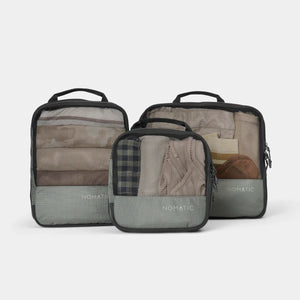
If you're traveling with a camera or extra electronics, a dedicated tech organizer pocket earns its keep. The Navigator Tech Organizer style of packing — small pouches inside a larger bag — keeps cables from turning into a knot at security. Common mistake: buying the highest-compartment-count bag assuming more organization is always better; it usually just means more zippers to search.
6. Decide between a backpack and a hybrid travel pack based on trip length
For flights under three days, a 15-20L daypack-style laptop backpack is usually enough. For longer trips where the backpack is your only bag, a larger travel pack (30L-plus) that still meets carry-on sizing does double duty as a laptop bag and a weekender.
The Navigator Travel Backpack 32L is built for three-to-five-day trips while staying inside standard carry-on dimensions. Expected outcome: one bag covers both the laptop and the clothing without checking anything. Common mistake: buying a 40L-plus "travel backpack" that technically fits carry-on dimensions but is packed so full it won't slide under most under-seat allowances.
Troubleshooting
The bag measures fine flat but fails the sizer when packed. Repack with the laptop in its own sleeve and compressible items (clothing, not electronics) in the main compartment, then remeasure fully loaded — sizers check the packed bag, not the empty one.
Laptop compartment doesn't open flat at the TSA bin. If the sleeve only unzips 80 percent of the way, the checkpoint line behind you gets slower and the laptop is harder to slide back in. Look for a compartment that lays fully flat, ideally against the back panel.
Shoulder pain after a full day of terminal walking. This usually means the back panel isn't rigid enough to distribute weight, or the load sits too low on your back. A sternum strap and a structured back panel fix most of this in one adjustment.
Bag passes personal-item sizing but the airline still asks you to gate-check it. Overhead bin space runs out on full flights regardless of your bag's dimensions — a backpack that fits under the seat in front of you is exempt from this in most cases, so check the under-seat dimension specifically, not just the overhead bin limit.
Charger and cables end up loose in the main compartment. A separate tech organizer pouch solves this without adding bulk — worth adding even to a bag that doesn't ship with one built in.
Tools and resources
- Your departure airline's official carry-on size page (check before every trip, not once a year)
- A kitchen scale for comparing empty bag weight
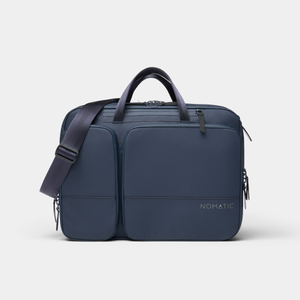
- Laptop Bag for a slim, single-compartment option if you're not checking clothing at all
- Nomatic's guide on laptop backpacks for men for sizing and fit comparisons across more models
What to do next
Once the backpack itself is sorted, packing technique matters almost as much as the bag. Read through Nomatic's guide to one-bag travel with a carry-on backpack to see how to fit a full trip's worth of gear into a single laptop backpack without checking anything at the gate in 2026.
FAQ
What size laptop backpack fits carry-on rules in 2026?
Most US carriers cap carry-on bags around 22 x 14 x 9 inches in 2026, though budget and regional carriers often run smaller. Check your specific airline's page before buying, since sizing gets enforced more strictly on full flights.
Is a 15L or 32L backpack better for a laptop-only flight?
A 15L bag like the Navigator Backpack 15L covers a laptop, charger, and daily items for trips under three days. A 32L pack like the Navigator Travel Backpack 32L works better when the backpack is your only bag for longer trips.
Does a laptop backpack need a separate TSA-friendly compartment?
Yes, a laptop compartment that unzips flat and independently from the main pocket speeds up security significantly. Bags without this layout force you to unpack clothing just to remove the laptop at the checkpoint.
How much should a laptop backpack weigh empty?
A well-built laptop backpack weighs between 2 and 3.5 lbs empty in 2026. Anything heavier eats into the practical amount you can pack before the bag feels overloaded.
Can a laptop backpack double as a personal item and a carry-on?
Some backpacks meet both personal-item and carry-on dimensions depending on the airline, but the two categories aren't the same on every carrier. Verify the specific dimension limit for the fare class you booked before assuming a bag qualifies as both.
What's the difference between a laptop backpack and a travel backpack?
A laptop backpack is built around one padded tech compartment and daily-carry pockets, typically 15-20L. A travel backpack, like the Navigator Travel Backpack 32L, adds clothing storage and compression for multi-day trips while still holding a laptop.
Do laptop backpacks need a rain cover for flights?
Not for the flight itself, but a water-resistant exterior fabric protects the laptop compartment during a rainy walk to the gate or a wait on the tarmac stairs. This matters more for connecting flights with outdoor tarmac transfers.
One last thing
The single biggest carry-on rejection cause isn't backpack dimensions — it's an overstuffed exterior pocket that adds an extra inch of bulge past the bag's stated size. Pack the front pocket last and check it doesn't push past the main compartment's profile before you leave for the airport in 2026.
 Your Privacy Choices